Web app development company for businesses
As a web app development company, we build web applications that replace spreadsheets, email threads and disconnected tools with one place to work. Staff and customers sign in from any browser, and the application reads and writes the systems you already run.
What it is and when it fits
A web application is software people open in the browser. Nobody installs anything, everyone uses the same version, and changes are live as soon as we ship them. We build in TypeScript with React and Next.js, on Postgres, with APIs in TypeScript or Python. Much of the software a business runs on is a web application of some kind, such as an internal tool, a customer portal, a SaaS product or an operations dashboard.
A custom web application makes sense when a process has outgrown its spreadsheets, when several tools are stitched together by hand, or when no product fits how you work. When people need the camera, offline access or push notifications on their phone, a mobile app is the better front end, and it can share the same back end. For a few simple forms on one data source, a low-code builder can be enough, and we will tell you so.
What we build
Internal tools and admin panels
Screens to manage orders, customers, stock or cases, with the validation, permissions and change history a spreadsheet cannot give you.
Customer portals
A signed-in place where customers onboard, share documents and follow the status of their orders or cases.
SaaS products
Multi-tenant products you sell to other companies, with single sign-on, roles and subscription billing.
Operations dashboards
Live views of capacity, backlog or performance, drawn from the systems that hold the data.
Integrations with your systems
Two-way connections to your ERP, CRM, accounting or warehouse system, so nobody types data over.
Roles, access and audit logs
Sign-in through your identity provider, permissions per role and a log of every sensitive action.
A web application we built: Moneyline.
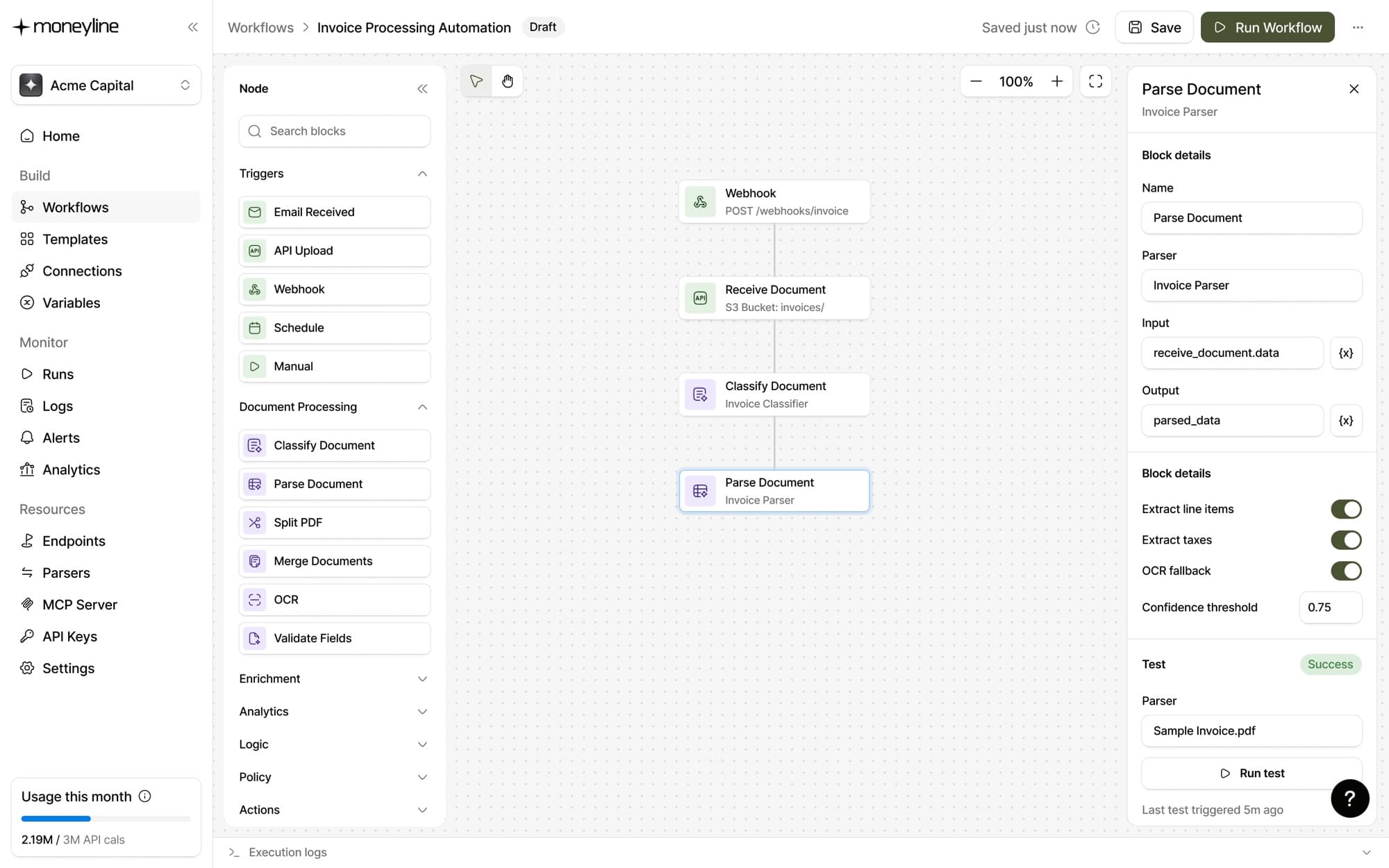
Moneyline is an open-source platform that reads and processes financial documents, and it is live at moneyline.co (opens in a new tab). Besides its API and MCP server, it has two web applications that finance and operations teams work in: an API dashboard and a visual workflow builder. Both call the same services as the API, so a step in a workflow and an API endpoint behave the same way.
Operators put document workflows together on a canvas without writing code: a trigger, then steps to classify, parse, validate and enrich, each with its own settings such as a confidence threshold and OCR fallback.
Underneath both are user roles, single sign-on and an audit log. Read the full Moneyline case study.
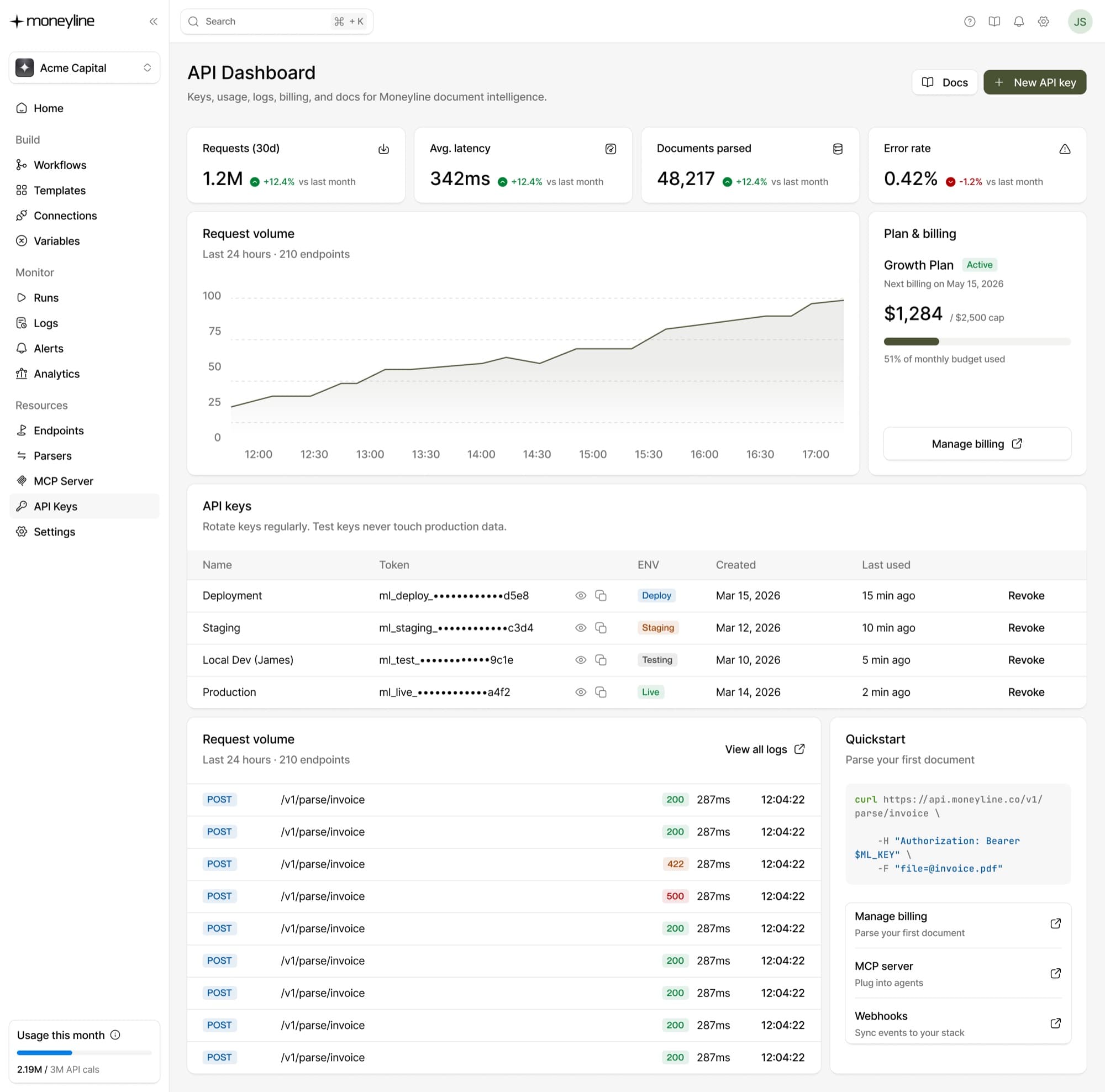
API dashboard. Usage, API keys per environment, billing and request logs.
Workflow builder. Each block on the canvas is a service the API also exposes.
Screenshots show sample data.
When a web application is the right choice.
| If you need | Choose | Why |
|---|---|---|
| Staff to work at a desk across several systems | A web application | One screen for the whole process, nothing to install |
| People in the field with the camera, GPS or offline access | A mobile app on the same back end | Device access a browser does not give you |
| A few simple forms on one data source | A low-code builder | Quicker and cheaper for simple cases |
| A process your whole sector runs on a standard product | Off-the-shelf software | No build to maintain |
Some kinds of web application have their own page: internal tools, customer portals and SaaS products. For phones, see mobile app development.
How it works
- 01
Map the work
We watch how the process runs today, collect the spreadsheets and tools involved, and agree what the first release must do.
- 02
Design with the users
We sketch the key screens and test them with the people who will use them before anything is built.
- 03
Build in short cycles
Every week or two you use working software on a staging environment, connected to test copies of your systems.
- 04
Go live and keep improving
We move your data across and run next to the old process until the team is confident, then monitor, fix and keep building or hand over to your team.
Related work
Built with
All technologiesA guide to start with
Further reading
When custom software beats off-the-shelf
A practical way to decide between off-the-shelf software and custom development, covering total cost of ownership, integrations and risk.
5 min read
API integrations explained, with examples
An API integration lets two systems exchange data without anyone re-typing it. How one works, examples from finance and operations, the ways to get one built, what can go wrong and what drives the cost.
10 min read
Common questions
A website mainly publishes information. A web application is software people sign in to and work in: they create, change and approve records, and the application saves them to a database and your other systems.
Yes. We build responsive interfaces that work in mobile browsers. If people need offline access, the camera or push notifications, we add a mobile app on the same back end.
In EU regions by default, on Vercel, Railway, AWS or Azure, or inside your own cloud account. The accounts are in your name, so hosting stays under your control.
The number of user roles and screens, integrations with other systems, data migration, and requirements such as single sign-on and audit logs. We scope a first release that handles the most important work, then build in phases.